Fatture in Cloud + CRM: Why Native Integration Makes the Difference
Discover how native Fatture in Cloud integration with your CRM eliminates double data entry, automates invoicing and saves hours every week.

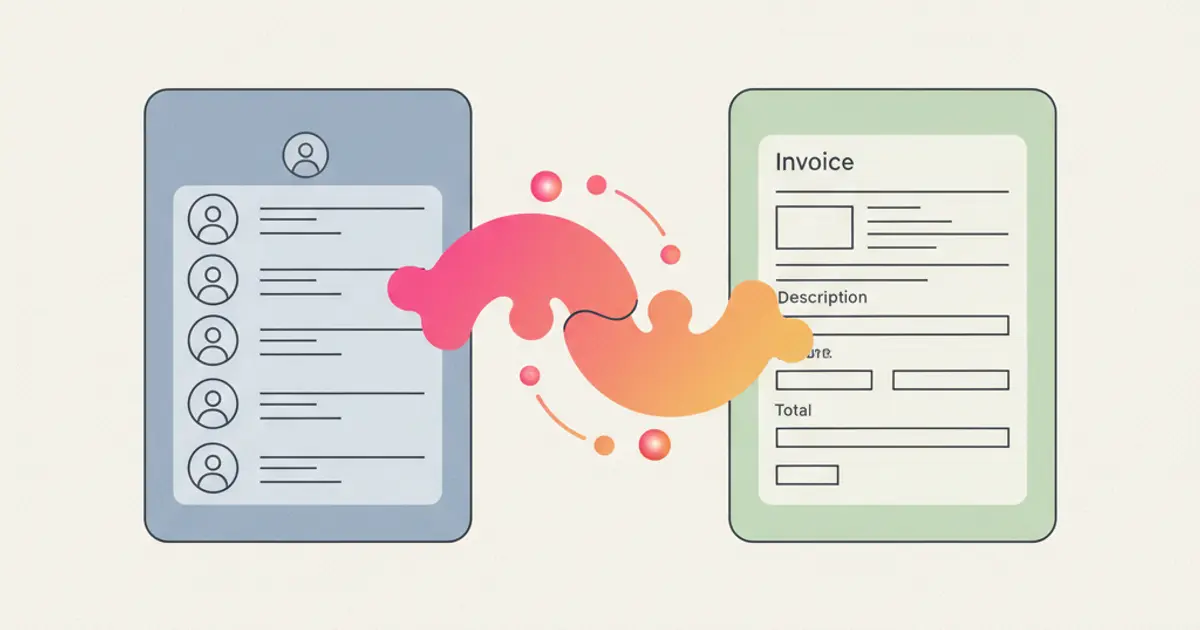
If your sales team closes deals in the CRM and your accounting team creates invoices in Fatture in Cloud, you're running two parallel universes that should be one. Every time someone copies a client's VAT number from one system to the other, every time a sales rep asks "has this invoice been paid?" and waits for accounting to check — that's not just inefficiency. It's a structural problem that compounds as your business grows.
Fatture in Cloud is the most widely used invoicing platform among Italian SMEs and freelancers, and for good reason. It handles electronic invoicing, SDI submissions, receipts, and fiscal compliance with remarkable ease. But Fatture in Cloud is an invoicing tool, not a CRM. It doesn't track leads, manage pipelines, assign tasks, or automate follow-ups. You need both — and more importantly, you need them connected.
Native integration means your CRM and Fatture in Cloud share data automatically, in real time, without third-party middlemen or CSV exports. When a deal moves to "won," the invoice drafts itself. When a payment lands, the deal updates. This article explores what native integration actually looks like, why it matters more than you think, and how to stop treating invoicing and sales as separate departments.
The problem: two systems, zero connection
When your CRM and your invoicing platform operate independently, the friction accumulates in ways that are easy to overlook individually but devastating in aggregate. The most obvious symptom is duplicate data entry. Every client that exists in your CRM must also be created in Fatture in Cloud, with the same VAT number, the same address, the same fiscal details. Every time one of these fields changes — a new address, an updated SDI code — it must be updated in both systems.
Beyond the time this consumes, the real danger is data inconsistency. When the same client has slightly different records in two systems — a typo in the VAT number, an outdated address in one but not the other — invoices go out with incorrect information. This creates compliance issues with electronic invoicing requirements and, in the worst cases, rejected invoices that need to be corrected and resubmitted.
The sales team suffers from a visibility gap. A sales representative who wants to know whether a client's last invoice has been paid must ask the accounting team, who must log into Fatture in Cloud, look up the client, check the payment status, and report back. This back-and-forth takes minutes per inquiry and happens dozens of times per week in a busy organization. Meanwhile, the sales rep delays a follow-up call because they do not want to push for a new deal when a previous payment is outstanding.
The accounting team, for their part, deals with an invoicing bottleneck. They cannot create an invoice until they receive the deal details from sales. Those details often arrive late, incomplete, or in an informal format — a chat message, an email, a verbal request. The result is invoices that are created days or even weeks after the deal closes, harming cash flow and creating month-end reconciliation headaches. For teams interested in improving their overall sales pipeline management, fixing the invoicing gap is often the highest-leverage improvement available.
What native integration actually means
The term "integration" is used loosely in the software world, and not all integrations are created equal. Understanding the difference between real-time bidirectional sync and other approaches is important before you invest in a solution.
A batch import means someone periodically exports data from one system and imports it into the other. This is not integration — it is manual synchronization with all the delays and errors that implies. A third-party automation connector is a step up: it can trigger actions in one system based on events in the other. But these middleware connections introduce an external dependency, have latency measured in minutes rather than seconds, and tend to break under real-world conditions — especially when data formats change or API rate limits are hit.
Native integration is fundamentally different. The CRM and Fatture in Cloud communicate directly through their APIs, with the logic built into the CRM itself. Data flows in real time, in both directions, without intermediate services. When you create a new client in the CRM, the client record appears in Fatture in Cloud within seconds. When an invoice is paid in Fatture in Cloud, the corresponding deal in the CRM is updated immediately.
The data that flows automatically includes client creation (new client in the CRM triggers automatic creation in Fatture in Cloud with all fiscal details), invoice generation (a deal marked as won generates a draft invoice with the correct line items, amounts, and VAT rates), payment tracking (payments recorded in Fatture in Cloud update the deal status and trigger notifications in the CRM), and credit notes and receipts (handled without manual intervention on either side).
Key benefits for your business
Time savings
The most immediate benefit is measurable in hours. For a team of ten, the elimination of double data entry, manual invoice creation, and payment status inquiries typically saves five to eight hours per week. Over a month, that is an entire work week recovered. Over a year, the savings are substantial enough to justify the CRM investment on their own, independent of any other benefit.
Copy-paste errors disappear because there is no copy-pasting. The client's VAT number is entered once, in the CRM, and propagated automatically. Invoice line items are pulled from the deal record, not retyped from memory or a screenshot. This elimination of manual steps does not just save time — it eliminates an entire category of errors that previously required time to detect and correct.
Month-end closing becomes faster because the data is already reconciled. The CRM and Fatture in Cloud agree on which invoices exist, which are paid, and which are outstanding. There is no scramble to match records, no hunting for discrepancies, no late-night spreadsheet reconciliation.
Better cash flow visibility
When payment data flows into the CRM, your sales team gains something they have never had before: real-time visibility into outstanding payments without leaving their primary workspace. A sales rep preparing for a client call can see at a glance whether the last invoice has been paid, whether there are overdue amounts, and what the client's overall payment history looks like.
This visibility enables smarter sales conversations. You would not push for a new engagement with a client who has three unpaid invoices without addressing the payment situation first. Conversely, a client with a perfect payment history is someone you can confidently upsell, knowing the commercial relationship is healthy.
Automated workflows can be triggered by payment events. When an invoice becomes overdue, the CRM can automatically send a polite reminder via email or WhatsApp. When a large payment lands, the account manager can be notified so they can send a personal thank-you. These workflows connect the financial side of the business to the relationship side in ways that were previously impossible without manual monitoring.
Compliance without effort
For Italian businesses, electronic invoicing compliance is not optional. Every invoice must be formatted as XML, submitted through the SDI (Sistema di Interscambio), and stored for the legally required period. Native integration handles this transparently. The invoice is generated in the correct format, submitted through the proper channels, and the submission status is tracked within the CRM. VAT calculations, split payment rules, and stamp duty are applied automatically based on the deal and client configuration.
This is particularly valuable for businesses that issue a high volume of invoices. Manual compliance checking is feasible when you send ten invoices a month. When you send a hundred, automated compliance is not a convenience — it is a necessity.
How the integration works in practice
Connecting your CRM to Fatture in Cloud is a straightforward process that typically takes less than thirty minutes. The setup involves authorizing the connection through Fatture in Cloud's API, configuring the sync preferences (which data flows automatically and which requires manual confirmation), and running an initial synchronization to align existing records.
What syncs includes clients (bidirectional), invoices (CRM to Fatture in Cloud), payments (Fatture in Cloud to CRM), and credit notes. Configuration options let you choose between fully automatic invoice creation — where a draft invoice is generated the moment a deal is won — and semi-automatic mode, where the draft is created but requires a human review before being finalized.
The same logic applies upstream, when orders come from an online shop rather than from a deal. With WooCommerce and the CRM in sync there is a single catalogue and stock updates on confirmed orders, so the data you later bill from does not have to be copied out of a second system. Setting up that connection, from the API keys to field mapping, is covered in the guide to warehouse management and WooCommerce sync.
Edge cases are handled gracefully. Partial payments update the invoice status to reflect the amount received and the remaining balance. Multi-line invoices with different VAT rates are composed correctly from the deal's service lines. Pro-forma invoices can be generated separately from final invoices when the business process requires a pre-billing step. For consultants and freelancers who rely on Fatture in Cloud for their entire billing workflow, the integration is especially transformative.
Common mistakes to avoid
The most frequent mistake is connecting the two systems without first cleaning up duplicate contacts. If the same client exists in both systems with slightly different data, the sync will either create duplicates or merge records incorrectly. Take the time to deduplicate before you activate the integration. It is a one-time effort that prevents ongoing headaches.
Field mapping deserves careful attention. Your CRM may use different field names or structures than Fatture in Cloud. Verifying that each field maps correctly — company name, VAT number, SDI code, PEC address — prevents invoices from going out with missing or misplaced information.
Training the team on the new workflow is essential. If your sales reps are accustomed to sending an email to accounting when a deal closes, they need to understand that this step is now automated. If your accountants are used to manually creating every invoice, they need to trust that the system is doing it correctly. Change management matters as much as the technical setup.
Finally, do not expect integration to fix broken processes. If your deal records are incomplete — missing line items, vague descriptions, no VAT rate specified — the integration will faithfully generate incomplete invoices. The integration automates your existing process; it does not improve it. Clean up your data and your process first, then automate.
Is it worth it? The ROI calculation
The return on investment for native invoicing integration is among the easiest to calculate in the CRM world. On the before side, count the hours spent on duplicate data entry, manual invoice creation, payment status inquiries, and error correction. Multiply by the loaded hourly cost of the people involved. Add the cost of delayed invoicing on your cash flow — even a few days' delay on a significant invoice has a real working-capital impact.
On the after side, the flow is automated. Client data syncs once and stays current. Invoices generate from deal data. Payment status is visible in real time. Errors from manual transcription are eliminated. The break-even timeline for a typical Italian SME is measured in weeks, not months. For a broader view of how automatic invoicing fits into your business operations, and to learn more about choosing a CRM that includes these capabilities, our guide on how to choose a CRM for SMEs in 2026 is a useful starting point.
Share this article
Written by
Luca Bosso
Founder of Flusia
Related articles
Late Invoices? How to Automate Billing and Get Paid Faster
Learn how to automate invoicing in your SME with automatic queues, Fatture in Cloud integration and smart payment reminders.

AI in CRM: 10 Things Artificial Intelligence Does for You (While You Work)
Discover 10 practical ways AI inside your CRM automates tasks, scores leads, transcribes meetings and helps your team sell smarter in 2026.
CRM for Consultants: From Proposal to Invoice in One Flow
How freelancers and consultants use a CRM to manage leads, send proposals, track projects and automate invoicing in a single streamlined workflow.